 English
 Español
The Complete Guide to Choosing the Right US Power Cord for Your Device
Content
- 1 Why Choosing the Right Power Cord Matters
- 2 Understanding NEMA Plug Types Used in the US
- 3 IEC Connector Types: Matching the Device End
- 4 Voltage, Amperage and Wattage: Getting the Math Right
- 5 Wire Gauge (AWG) and Cord Length: Why They Affect Safety
- 6 Matching Cords to Common Devices
- 7 Safety Certifications and Red Flags
- 8 Step-by-Step: How to Identify the Cord You Need
- 9 Common Mistakes When Buying a Replacement Power Cord
- 10 Frequently Asked Questions
- 11 Quick Reference Checklist
Why Choosing the Right Power Cord Matters
Most people treat a power cord as an afterthought — a generic black cable that "just works" as long as it plugs in. In practice, a power cord is a rated electrical component with its own voltage limit, current-carrying capacity, and connector standard. Using the wrong one is not just an inconvenience; it is one of the more common causes of overheating outlets, melted connectors, and equipment damage in US homes and offices.
According to the U.S. Consumer Product Safety Commission, electrical fires connected to cords and plugs account for thousands of residential fires every year, and undersized or mismatched cords are a recurring factor. A correctly chosen cord, on the other hand, is inexpensive — typically $5 to $25 for a standard replacement — and eliminates that risk entirely.
In short: the "right" cord is defined by four things — the wall-side plug type (NEMA), the device-side connector (IEC), the voltage/amperage rating, and the wire gauge. Get all four correct and the cord will be safe, compatible, and durable.
Understanding NEMA Plug Types Used in the US
In North America, the wall-outlet end of a power cord follows the NEMA (National Electrical Manufacturers Association) standard. The two digits before the letter describe the voltage/configuration class, and the letter tells you whether it is a plug (P) or receptacle (R). Here are the types you will actually encounter with consumer and light commercial electronics:
| NEMA Type | Voltage | Amperage | Typical Use |
| 5-15P (2-prong or 3-prong) | 120V | 15A | Standard household outlet; laptops, monitors, lamps, small appliances |
| 5-20P | 120V | 20A | Kitchens, workshops, server racks, high-draw electronics (recognizable by the sideways prong blade) |
| 6-15P | 250V | 15A | Window AC units, some pro audio and industrial equipment |
| 6-20P | 250V | 20A | Server racks, PDUs, heavier 240V shop tools |
| L5-15P / L6-20P (twist-lock) | 120V / 250V | 15A / 20A | Data centers, stage/event power, outdoor equipment where accidental disconnection must be prevented |
If you are simply replacing a cord for a laptop, monitor, printer, or lamp, you will almost always need a NEMA 5-15P. The main exception is dedicated server, rack, or large-appliance equipment, which often specifies 5-20P or 6-20P on its own nameplate.
IEC Connector Types: Matching the Device End
The wall-side plug is only half the story. The connector that plugs into the device itself follows the IEC 60320 standard, and picking the wrong one is the single most common mistake buyers make when ordering a "universal" replacement cord online.
| Connector | Nickname | Common Devices |
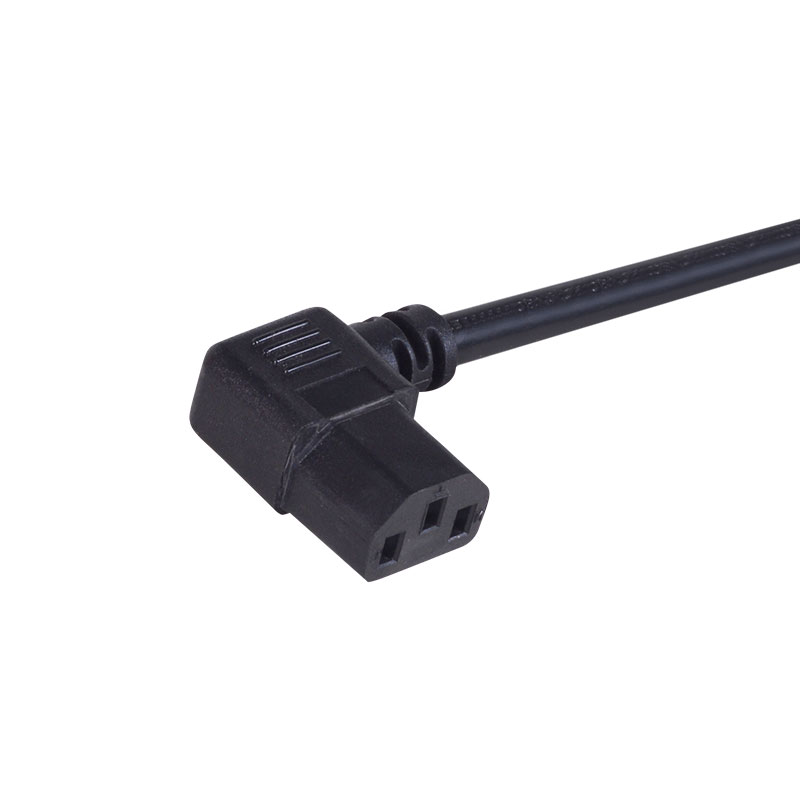
| C13 / C14 | "Kettle plug" or computer cord | Desktop PCs, monitors, printers, gaming consoles (PS5, Xbox), amplifiers |
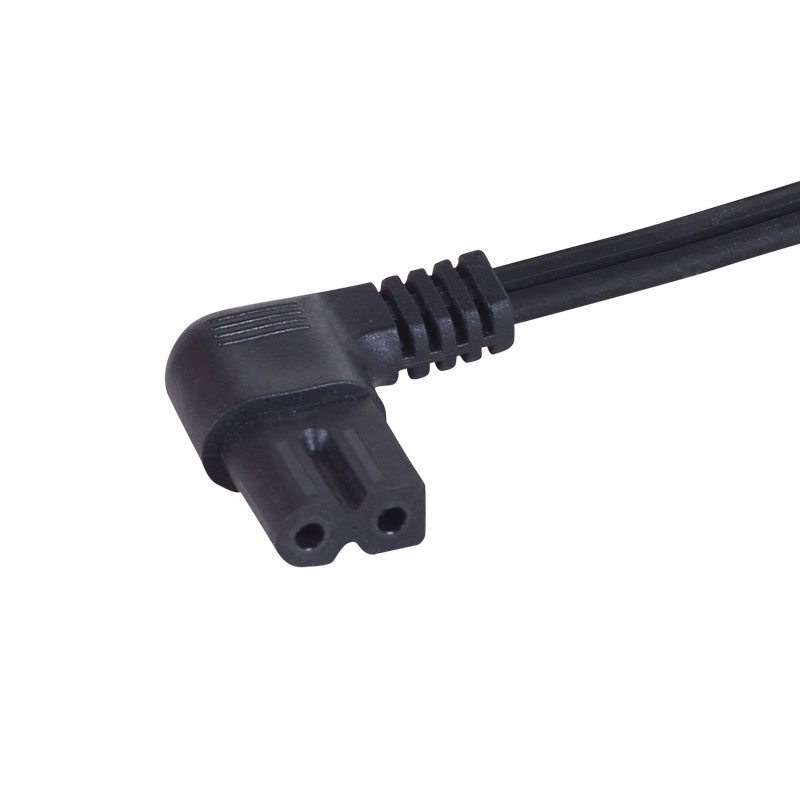
| C7 / C8 | "Figure-8" cord | Laptop power bricks, game console power supplies, small speakers, cameras |
| C5 / C6 | "Cloverleaf" or "Mickey Mouse" plug | Compact laptop chargers, small AV equipment |
| C19 / C20 | Heavy-duty computer cord | Server rack PDUs, UPS units, high-draw commercial equipment |
To identify the right one, unplug the current cord and look at the female connector on the device. Count the pin holes, note whether the corners are square (C13/C14 family) or rounded (C7/C8 family), and check for a ground pin — a missing ground pin is a strong sign you need the C7/C8 "figure-8" style rather than C13/C14.
Voltage, Amperage and Wattage: Getting the Math Right
Every power cord carries a maximum voltage and amperage rating, usually printed directly on the cord jacket (for example, "13A 125V"). Before buying, check your device's nameplate — printed on the bottom of a desktop PSU, the base of a lamp, or the back of a monitor — and confirm three numbers: input voltage, rated amperage, and wattage.
The US standard household supply is 120V. A standard 5-15P cord is rated for 125V and 13A to 15A, which covers roughly 1,500 to 1,800 watts at full load (Watts = Volts × Amps). That is more than enough headroom for virtually all consumer electronics:
| Device | Typical Draw | Cord Rating Needed |
| Laptop charger | 45–100W | Any standard 18 AWG, 13A cord |
| Desktop PC (mid-range) | 300–650W | 18 AWG C13/C14, 10A–13A |
| Space heater / window AC | 1,200–1,500W | 14 AWG, 15A dedicated cord (never a splitter or extension) |
| Server / rack PSU | 750–1,600W | 14–16 AWG C13/C19, 10A–20A depending on unit |
If a device's rated amperage exceeds what the cord is stamped for, the cord's internal wire can overheat well before a circuit breaker ever trips, because the breaker protects the household wiring, not the cord itself. This is why matching the cord's printed rating to the device's nameplate — not just to the wall outlet — is the step people skip most often.
Wire Gauge (AWG) and Cord Length: Why They Affect Safety
Wire gauge is measured in AWG (American Wire Gauge), and — somewhat counterintuitively — a lower number means a thicker, higher-capacity wire. Thicker wire has less electrical resistance, so it carries more current with less heat buildup. It also matters more as cord length increases, since resistance accumulates over distance.
| AWG | Max Amps (approx.) | Best For |
| 18 AWG | 10A | Laptops, lamps, small electronics, short desktop cords |
| 16 AWG | 13A | Desktop PCs, monitors, general-purpose extension cords under 25 ft |
| 14 AWG | 15A | Space heaters, power tools, longer extension cords (25–50 ft) |
| 12 AWG | 20A | Workshop equipment, generators, heavy-duty outdoor runs |
A practical rule: if you need a cord longer than 25 feet, step up one gauge from what the device technically requires. A 14 AWG cord run at 50 feet, for instance, experiences roughly double the voltage drop of the same cord at 25 feet, which can cause motors and heating elements to underperform even before any safety threshold is reached.
Matching Cords to Common Devices
To make this concrete, here is how the specs above translate into real shopping decisions for the devices people replace cords for most often:
- Laptop chargers: Most external power bricks use a C7 (figure-8, 2-prong, no ground) or C5 (cloverleaf, 3-prong) connector on an 18 AWG cord rated 10A/125V. Confirm which one by checking whether the port on the brick has 2 or 3 holes.
- Desktop computers and monitors: Almost universally C13/C14, 18 AWG, 10A. A 6-foot length covers most desk setups without extra slack.
- Gaming consoles (PS5, Xbox Series X): C13/C14 as well, though PS5 uses a slightly different notch shape from the generic computer cord — genuine or console-specific cords fit more securely.
- Kitchen appliances (coffee makers, air fryers): Usually hardwired, but replacement cords are 16 AWG minimum given the 1,000W+ heating loads involved.
- Window AC units: Check the nameplate carefully — many draw enough current to require a dedicated 15A circuit and a cord that is never shared with an extension cord or power strip.
- Server and rack equipment: C13/C14 for most 1U/2U servers under 1,500W; C19/C20 for high-density PDUs and larger UPS units.
Safety Certifications and Red Flags
In the US, a legitimate power cord should carry one of two safety marks: UL Listed (Underwriters Laboratories) or ETL Listed (Intertek). Both indicate independent third-party testing against recognized safety standards. Look for the mark stamped directly on the cord jacket or molded into the plug housing — not just printed on the retail packaging, which can be swapped.
Warning signs of a low-quality or counterfeit cord:
- No UL/ETL mark, or a mark that looks blurry, off-center, or inconsistent with genuine listings
- Prongs that wiggle or feel loose in the plug housing
- No AWG or amperage rating printed anywhere on the cable jacket
- A price far below comparable listed cords of the same length and gauge
- Cable that feels unusually light or thin for its stated gauge
Cords without proper certification are a leading contributor to the counterfeit electronics problem the CPSC and customs agencies flag every year, and they are disproportionately represented in cord-related fire incident reports.
Step-by-Step: How to Identify the Cord You Need
1. Check the device nameplate. Find the sticker or embossed panel listing input voltage, amperage, and wattage — usually on the underside or back of the unit.
2. Inspect the device-side connector. Count pins, note the shape (square vs. rounded corners), and check for a ground pin to identify the IEC type (C13/C14, C7/C8, C5/C6, or C19/C20).
3. Confirm the wall-side plug. For nearly all home and office use this will be a standard NEMA 5-15P; only heavy appliances or rack equipment need 5-20P or 6-20P.
4. Match or exceed the amperage rating. The replacement cord's stamped amperage should be equal to or greater than the device's rated draw — never lower.
5. Choose the right length and gauge together. Add one wire gauge step for any cord run longer than 25 feet.
6. Verify UL or ETL certification before purchasing, and buy from a retailer that lists the cord's full specs, not just "universal replacement cord."
Common Mistakes When Buying a Replacement Power Cord
- Buying by plug shape alone. Two cords can look identical at the wall end but have completely different wire gauges hidden inside the jacket.
- Ignoring the device's actual wattage. A gaming PC drawing 600W needs a sturdier cord than a printer drawing 40W, even though both may use a C13/C14 connector.
- Daisy-chaining extension cords to reach a device, which compounds voltage drop and increases fire risk — especially with heating appliances.
- Cutting off a "too-long" cord and re-splicing it without proper connectors, which voids any safety rating the original cord had.
- Assuming all "computer cords" are the same. A C13/C14 cord rated 7A is not interchangeable with one rated 15A on a high-draw workstation PSU.
- Overlooking outdoor-rated requirements. Indoor cords lack the jacket insulation (look for a "W" or "WA" suffix) needed for moisture and UV exposure outdoors.
Frequently Asked Questions
Can I use a 2-prong cord on a device that came with a 3-prong cord?
No. The third prong is a safety ground that protects against internal short circuits. If a device shipped with a grounded 3-prong plug, it was designed to rely on that ground path.
Is a higher-amperage cord ever a problem?
No — a cord rated for more amps than the device draws is always safe to use; the device simply draws what it needs. Problems only arise when the cord's rating is lower than the device's draw.
Do laptop chargers need a specific cord, or is any C7/C5 cable interchangeable?
Most generic C7 (figure-8) and C5 (cloverleaf) cables are interchangeable across brands as long as the amperage rating matches or exceeds the brick's requirement — the adapter itself, not the wall cord, does the actual conversion.
How do I know if my outlet is 15A or 20A?
A 15A outlet has two straight vertical slots of the same size; a 20A outlet has one slot with a horizontal "T" notch. Most homes are wired with 15A outlets except in kitchens, garages, and workshops.
Quick Reference Checklist
- Confirm the device's voltage, amperage, and wattage from its nameplate
- Match the IEC connector shape (C13/C14, C7/C8, C5/C6, or C19/C20) exactly
- Use NEMA 5-15P for standard household use; 5-20P/6-20P only for rated high-draw equipment
- Choose 18 AWG for light electronics, 16 AWG for desktops/monitors, 14 AWG or thicker for heaters and tools
- Step up one gauge for any run over 25 feet
- Buy only cords with a genuine UL or ETL mark stamped on the cord itself
- [email protected]
- +(86)-0574-62162605
- +(86)-137 0584 5290
- No. 5-2, Yaobei Avenue, Simen Town, Yuyao City, Ningbo, Zhejiang Province, China
Copyright © NINGBO ZHENJIA ELECTRIC APPLIANCES CO.,LTD. All Rights Reserved. Custom Temporary String Light Manufacturers
